Some time ago we started a series on Wireless QoS, and in the previous entry we discussed channel access and EDCA. Now let’s have a look at a more complete picture and how wireless QoS plays out from a design point of view.
There are a few points to consider, including QoS marking by client devices, overall design, and interaction with the underlying wired infrastructure.
QoS is really a set of tools enabling differentiation of network traffic. It allows us to classify network applications according to specific needs, mark the traffic according to these defined classifications, and finally, implement various prioritisation techniques to manipulate the priority and/or network resource allocations for our applications. Often, what makes the implementation of QoS challenging (specifically in larger organisations) is the requirement to maintain the required levels of service end-to-end, and across various wired and wireless infrastructure platforms. Each networking device may have a different feature set, or different set of supported QoS capabilities, and it can be challenging to ensure consistent user experience across these different platforms. As QoS is only really effective when deployed end-to-end (i.e. from source of the traffic to its final destination, and back), there can be a significant amount of effort required across multiple networking teams to derive a configuration which provides this consistent user experience. Not to mention that the classification of network applications has to be created in a way that supports business needs, and requires clear input from business decision-makers and not only the network engineering team(s). The complexity and scale of such an undertaking, and the required investment of time to get it right, is enough to scare off all but the most serious of players.
This post focuses on traffic marking. Consistent marking is the first step towards a working QoS configuration, assuming we already have a list of applications that we want to classify, and a marking strategy covering what markings will be applied to what application. As our traffic passes the various hops along the route from source to destination, it is the markings that enable the configuration of any prioritisation/queuing/scheduling techniques along the way.
Marking can be applied to network traffic in a number of ways, at Layer 2 (L2), and at Layer 3 (L3). At L2 marking is medium-dependent, in that options for storing the marking depend on the frame formats and L2 encapsulation of the specific link. At L3, traffic marking is achieved by setting appropriate bits inside the IP packet header itself.
Layer 2 marking
Of most importance here is the possibility of inserting a L2 marking into the 802.11 frame transmitted by the wireless device (both client and AP) over-the-air. The QoS control field in the MAC header portion of the frame allows us to do that. There are eight possible priority levels, these are defined as the User Priority (UP) value. In the previous post we already introduced the four Access Categories defined by the 802.11e amendment, the table below shows the mapping of Access Categories to User Priorities.
| User Priority (UP) | Access Category (AC) | Designation |
| 7 | AC_VO | Voice |
| 6 | AC_VO | Voice |
| 5 | AC_VI | Video |
| 4 | AC_VI | Video |
| 3 | AC_BE | Best Effort |
| 2 | AC_BK | Background |
| 1 | AC_BK | Background |
| 0 | AC_BE | Best Effort |
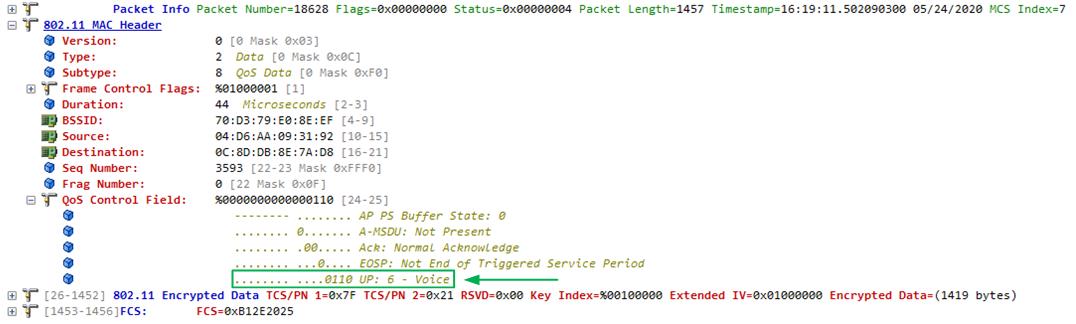
Already we can see that even though there are eight possible traffic classifications, there are only four access categories, this means we can provide differentiated services to a maximum of four different traffic classes over-the-air. The image below shows an 802.11 frame captured with an UP value of 6 (voice).
Of slightly less importance here, but worthy of mention, is the possibility of inserting a marking into a L2 wired frame. Consider that a WLC may be connected to a LAN switch using an 802.1Q trunk. The L2 trunk exists only between the switch and the WLC, and on this link we have the option of using the 802.1p value to specify the traffic marking. The 802.1p value (also called the Priority Code Point or Class of Service) is similar to (but not quite the same as) the 802.11e UP value. There are some small but very significant differences between the two.
| 802.11e Designation | 802.11e (UP) | 802.1p (CoS) | 802.1p Designation |
| Voice | 7 | 7 | Network Control |
| Voice | 6 | 6 | Internetwork Control |
| Video | 5 | 5 | Voice |
| Video | 4 | 4 | Video |
| Best Effort | 3 | 3 | Critical Applications |
| Background | 2 | 2 | Excellent Effort |
| Background | 1 | 1 | Background |
| Best Effort | 0 | 0 | Best Effort |
Layer 3 marking
At L3 we have the option of using the ToS or DS field (defined as ToS in RFC791, redefined as the DS field in RFC2474), an 8-bit value in the IP header.
ToS (Type of Service) – the decimal representation of the full 8-bits of the DS field.
DSCP (Differential Services Code Point) – the decimal representation of only the 6 most significant bits of the DS field.
PHB – Named Per Hop Behaviour for each traffic class, a more human-friendly way of talking about traffic classes. See RFC4594 – Configuration Guidelines for DiffServ Service Classes, for more detail on this.
| ToS (Decimal) | DSCP (Decimal) | PHB |
| 0 | 0 | CS0 |
| 32 | 8 | CS1 |
| 40 | 10 | AF11 |
| 48 | 12 | AF12 |
| 56 | 14 | AF13 |
| 64 | 16 | CS2 |
| 72 | 18 | AF21 |
| 80 | 20 | AF22 |
| 88 | 22 | AF23 |
| 96 | 24 | CS3 |
| 104 | 26 | AF31 |
| 112 | 28 | AF32 |
| 120 | 30 | AF33 |
| 128 | 32 | CS4 |
| 136 | 34 | AF41 |
| 144 | 36 | AF42 |
| 152 | 38 | AF43 |
| 160 | 40 | CS5 |
| 176 | 44 | VOICE-ADMIT |
| 184 | 46 | EF |
DSCP (and its associated PHB) is the generally accepted method of discussing traffic marking at L3. As DSCP uses only the first 6 bits of the DS field it gives 64 possible values, and therefore the option of differentiating between 64 traffic classes. The table above summarises the most commonly used, as well as those for which named PHB’s exist.

Let’s take an example of a classic (Cisco) CAPWAP deployment. In the image above we have a simple network layout depicting the flow of traffic, from client, through the wireless infrastructure, to the LAN switch, and vice-versa. The significant points along the path are marked with orange numbers for reference. Here we need to differentiate between upstream and downstream flows.
Downstream
1 – A marked IP packet arrives at the WLC from the upstream switch. Note that this link may be a L2 trunk and may also have an 802.1p marking. The WLC considers only the DSCP value from the IP header. Let’s say this is a video packet with a marking of AF41.
2 – The WLC needs to encapsulate the traffic going to the AP inside CAPWAP. Now we have the original IP header with a DSCP marking, and also a CAPWAP header with another DSCP marking. The original DSCP (inside) value is used to derive the CAPWAP DSCP (outside) value.
Note: There are configuration options to limit the maximum DSCP value through the use of QoS Profiles, for this example we do not consider any such policies and assume all DSCP values are allowed. The important thing to remember is that while the outside CAPWAP DSCP may differ from the inside packet DSCP, the inside DSCP will never be modified.
In our case the resulting CAPWAP marking is also AF41, the original packet is now encapsulated with CAPWAP and the inside marking remains unchanged.
3 – The AP decapsulates the CAPWAP payload, leaving only the original packet with the original marking. The packet is then framed inside an 802.11 header and transmitted downstream. The priority of the transmission, i.e. which Access Category (AC) it gets assigned to, is determined by the UP value. The UP value is derived from the DSCP value in the received CAPWAP header.
There is a dependency on the switched infrastructure between the AP and WLC to maintain the DSCP marking imposed at the WLC. If any switch along the path were to drop the marking the traffic would arrive at the AP with a CAPWAP DSCP of zero (0). Since the AP uses the CAPWAP marking to determine the appropriate AC, we would have this video payload transmitted to the client station with a default priority. Honouring of markings end-to-end is crucial to the correct operation of wireless QoS.
Upstream
1 – The client station transmits a packet to the AP. The packet will have a L3 (DSCP) marking and also a corresponding L2 marking (UP value). Let’s pause here quickly.
On the client device it is the responsibility of the application to set the L3 marking. Not all applications will set this. In a corporate environment using Windows clients this can be achieved through Group Policy. This means that the marking of applications is dependent on the team responsible for Active Directory, and will likely require co-operation between that team and the networking team. For non-Windows environments marking options largely depend on the type of device being used, in some cases it may be possible to use an MDM solution to enforce correct client application markings. At L2, markings by client devices also largely depend on the specific device being used. Some devices may not set any L2 marking at all (even if the application sets the appropriate L3 marking), while others may map incorrect UP values. See testing results further down.
2 – The AP needs to encapsulate the received payload inside CAPWAP for transmission to the upstream WLC. The outer DSCP of the CAPWAP header can be derived either from the DSCP of the original packet, or from the UP value. In case the UP value is used, the AP will use an UP-to-DSCP mapping table to assign the CAPWAP DSCP value. Some granularity may be lost here as we only have eight possible UP values and 64 possible DSCP values, this could become significant in some scenarios. Where the AP is configured to derive the CAPWAP DSCP from the original packet’s DSCP, the CAPWAP DSCP would be the same as the original DSCP, again, assuming no QoS limiting policies are configured.
3 – The WLC receives the CAPWAP encapsulated payload from the AP, decapsulates it, and transmits the data onto the upstream switch. If the LAN network is configured for L2 QoS, some WLCs can optionally be configured to insert a corresponding 802.1p value on the trunk link. Similarly to UP values, 802.1p values have only eight possible values and are not recommended in modern QoS implementations.
This example highlights the various touchpoints required to achieve consistent QoS markings in a CAPWAP deployment. Key takeaways are:
- End-to-end DSCP trust on the underlying LAN infrastructure is required.
- Client markings need to be carefully managed and tested between device types.
- Unnecessary translation between L2 markings (CoS, UP) and L3 markings (DSCP) should be avoided.
To demonstrate some of these concepts we set up a small lab, and generated marked traffic from a couple of wireless clients. By using wired and wireless sniffers we are able to verify the QoS markings along the path.

The two client devices tested are Samsung Galaxy S8 and Samsung Galaxy S10e phones, traffic was generated using iPerf.
Test 1: UP-to-DSCP map
Here we use the UP values set by the client device to derive DSCP value for the CAPWAP header. The UP-to-DSCP mapping tables were left at their default settings.
| UP-DSCP map | Sent | Sent | Sent | Sent | CAPWAP | Received |
| Galaxy S8 | ToS | DSCP | PHB | UP | PHB | PHB |
| 0 | 0 | CS0 | 0 | CS0 | CS0 | |
| 32 | 8 | CS1 | 1 | Unknown | CS1 | |
| 40 | 10 | AF11 | 3 | AF21 | AF11 | |
| 48 | 12 | AF12 | 3 | AF21 | AF12 | |
| 56 | 14 | AF13 | 3 | AF21 | AF13 | |
| 64 | 16 | CS2 | 2 | AF11 | CS2 | |
| 72 | 18 | AF21 | 3 | AF21 | AF21 | |
| 80 | 20 | AF22 | 3 | AF21 | AF22 | |
| 88 | 22 | AF23 | 3 | AF21 | AF23 | |
| 96 | 24 | CS3 | 3 | AF21 | CS3 | |
| 104 | 26 | AF31 | 4 | AF31 | AF31 | |
| 112 | 28 | AF32 | 4 | AF31 | AF32 | |
| 120 | 30 | AF33 | 4 | AF31 | AF33 | |
| 128 | 32 | CS4 | 4 | AF31 | CS4 | |
| 136 | 34 | AF41 | 4 | AF31 | AF41 | |
| 144 | 36 | AF42 | 4 | AF31 | AF42 | |
| 152 | 38 | AF43 | 4 | AF31 | AF43 | |
| 160 | 40 | CS5 | 5 | AF41 | CS5 | |
| 176 | 44 | VOICE-ADMIT | 5 | AF41 | VOICE-ADMIT | |
| 184 | 46 | EF | 6 | EF | EF |
| UP-DSCP map | Sent | Sent | Sent | Sent | CAPWAP | Received |
| Galaxy S10e | ToS | DSCP | PHB | UP | PHB | PHB |
| 0 | 0 | CS0 | 0 | CS0 | CS0 | |
| 32 | 8 | CS1 | 1 | Unknown | CS1 | |
| 40 | 10 | AF11 | 0 | CS0 | AF11 | |
| 48 | 12 | AF12 | 0 | CS0 | AF12 | |
| 56 | 14 | AF13 | 0 | CS0 | AF13 | |
| 64 | 16 | CS2 | 0 | CS0 | CS2 | |
| 72 | 18 | AF21 | 3 | AF21 | AF21 | |
| 80 | 20 | AF22 | 3 | AF21 | AF22 | |
| 88 | 22 | AF23 | 3 | AF21 | AF23 | |
| 96 | 24 | CS3 | 4 | AF31 | CS3 | |
| 104 | 26 | AF31 | 4 | AF31 | AF31 | |
| 112 | 28 | AF32 | 4 | AF31 | AF32 | |
| 120 | 30 | AF33 | 4 | AF31 | AF33 | |
| 128 | 32 | CS4 | 4 | AF31 | CS4 | |
| 136 | 34 | AF41 | 4 | AF31 | AF41 | |
| 144 | 36 | AF42 | 4 | AF31 | AF42 | |
| 152 | 38 | AF43 | 4 | AF31 | AF43 | |
| 160 | 40 | CS5 | 5 | AF41 | CS5 | |
| 176 | 44 | VOICE-ADMIT | 6 | EF | VOICE-ADMIT | |
| 184 | 46 | EF | 6 | EF | EF |
There are some differences between the markings sent by the two client stations. For example, the UP value for the VOICE-ADMIT class is different between the phones. UP 5 for the Galaxy 8, and UP 6 for the Galaxy S10e. This results in the CAPWAP DSCP being set to AF41 and EF respectively. Strictly speaking neither of which are correct, as VOICE-ADMIT is its own PHB and should not be treated as AF41 or EF. It is possible that the LAN portion of the network (between the AP and WLC) consists of more than just a single switch. It is also possible that the LAN could be implementing traffic prioritisation based on DSCP, and this would include the CAPWAP flows. In this case it would not be possible to differentiate the VOICE-ADMIT traffic, as it would fall into either the AF41 or EF classes (assuming these are implemented on the LAN). Similarly, CS4 and AF41 are both assigned a CAPWAP marking of AF31. CS4 and AF41 are typically used to differentiate different types of video flows, in this case not only are we unable to differentiate between them, they are also both mapped to a lower AF31 value. These examples highlight some of the issues with using 3-bit QoS values for larger deployments.
The second client issue is that the S10e does not set any UP values at all for AF11, AF12, AF13, and CS2.
Moving to the infrastructure side we see that possible CAPWAP DSCP values include only CS0, AF11, AF21, AF31, AF41, and EF. This again has implications on the LAN side if the LAN was implementing a QoS model using more than six classes.
Additionally, the CAPWAP PHB value for CS1 traffic was not correctly decoded by the capture software and is reported as ‘Unknown’. Looking further into this it appears that the value is set as ToS 0x08, which represents decimal 8 (DSCP), not decimal 32 (ToS). At packet level, all other CAPWAP markings are set using hexadecimal ToS values. The hexadecimal value for CS1 would be ToS 0x20.
Note that the received PHB is always the same as the marking sent in the original packet.
Test 2: DSCP-Trust
Here we trust the incoming DSCP value and use it to derive the DSCP value for the CAPWAP header.
| Trust DSCP | Sent | Sent | Sent | Sent | CAPWAP | Received |
| Galaxy S8 | ToS | DSCP | PHB | UP | PHB | PHB |
| 0 | 0 | CS0 | 0 | CS0 | CS0 | |
| 32 | 8 | CS1 | 1 | CS1 | CS1 | |
| 40 | 10 | AF11 | 3 | AF11 | AF11 | |
| 48 | 12 | AF12 | 3 | AF12 | AF12 | |
| 56 | 14 | AF13 | 3 | AF13 | AF13 | |
| 64 | 16 | CS2 | 2 | CS2 | CS2 | |
| 72 | 18 | AF21 | 3 | AF21 | AF21 | |
| 80 | 20 | AF22 | 3 | AF22 | AF22 | |
| 88 | 22 | AF23 | 3 | AF23 | AF23 | |
| 96 | 24 | CS3 | 3 | CS3 | CS3 | |
| 104 | 26 | AF31 | 4 | AF31 | AF31 | |
| 112 | 28 | AF32 | 4 | AF32 | AF32 | |
| 120 | 30 | AF33 | 4 | AF33 | AF33 | |
| 128 | 32 | CS4 | 4 | CS4 | CS4 | |
| 136 | 34 | AF41 | 4 | AF41 | AF41 | |
| 144 | 36 | AF42 | 4 | AF42 | AF42 | |
| 152 | 38 | AF43 | 4 | AF43 | AF43 | |
| 160 | 40 | CS5 | 5 | CS5 | CS5 | |
| 176 | 44 | VOICE-ADMIT | 5 | VOICE-ADMIT | VOICE-ADMIT | |
| 184 | 46 | EF | 6 | EF | EF |
| Trust DSCP | Sent | Sent | Sent | Sent | CAPWAP | Received |
| Galaxy S10e | ToS | DSCP | PHB | UP | PHB | PHB |
| 0 | 0 | CS0 | 0 | CS0 | CS0 | |
| 32 | 8 | CS1 | 1 | CS1 | CS1 | |
| 40 | 10 | AF11 | 0 | AF11 | AF11 | |
| 48 | 12 | AF12 | 0 | AF12 | AF12 | |
| 56 | 14 | AF13 | 0 | AF13 | AF13 | |
| 64 | 16 | CS2 | 0 | CS2 | CS2 | |
| 72 | 18 | AF21 | 3 | AF21 | AF21 | |
| 80 | 20 | AF22 | 3 | AF22 | AF22 | |
| 88 | 22 | AF23 | 3 | AF23 | AF23 | |
| 96 | 24 | CS3 | 4 | CS3 | CS3 | |
| 104 | 26 | AF31 | 4 | AF31 | AF31 | |
| 112 | 28 | AF32 | 4 | AF32 | AF32 | |
| 120 | 30 | AF33 | 4 | AF33 | AF33 | |
| 128 | 32 | CS4 | 4 | CS4 | CS4 | |
| 136 | 34 | AF41 | 4 | AF41 | AF41 | |
| 144 | 36 | AF42 | 4 | AF42 | AF42 | |
| 152 | 38 | AF43 | 4 | AF43 | AF43 | |
| 160 | 40 | CS5 | 5 | CS5 | CS5 | |
| 176 | 44 | VOICE-ADMIT | 6 | VOICE-ADMIT | VOICE-ADMIT | |
| 184 | 46 | EF | 6 | EF | EF |
We see the same issues on the client side, there are still differences between the VOICE-ADMIT markings, and the S10e still does not set any UP values for AF11, AF12, AF13, or CS2. However, in this case it does not matter, as we are using the DSCP values, not the UP values, to derive the CAPWAP markings. On the infrastructure side, any issues with mapping between UP and DSCP are avoided and we see all CAPWAP PHBs correctly decoded. We also now have the full range of values available for CAPWAP marking.
Even in this small test lab, moving to a trusted DSCP model has resolved a number of issues and we have a more consistent result.
Once you get down into the details, there is a long list of factors to consider when designing and deploying an end-to-end QoS model. This post only focused on marking the wireless portion, and only using a single example topology. Differences in the operation of various clients need to be taken into account, as well as differences in the operation of various infrastructure platforms. In both cases (clients and infrastructure) the expected behaviour can vary between models and between software versions.